nginx1.28 添加lua支持
一、软件版本
操作系统 almalinux9.
- nginx-1.28.0
- lua-cjson-2.1.0.9
- headers-more-nginx
- luajit2-2.1-20250117
- lua-resty-core-0.1.31
- lua-resty-lrucache-0.15
- lua-nginx-module-0.10.28
- nginx_sticky_module_ng-0.0.2
- ngx_devel_kit-0.3.3
- ngx_healthcheck_module
- openssl-3.5.0
- pcre-8.42
- zlib 1.3.1
libxml2 libxslt 采用系统自带版本使用yum install libxslt-devel libxml2-devel安装。
系统需要有 gcc gcc-c++编译器。
系统需要安装的依赖:
yum install perl-FindBinperl-IPC-Cmd perl-ExtUtils-MM-Utils perl-I18N-LangTags,perl-Locale-Maketext perl-Locale-Maketext-Simple perl-Module-CoreList perl-Module-Load perl-Module-Load-Conditional perl-Module-Metadata perl-Params-Check perl-Time-HiRes perl-locale perl-version perl-File-Compare perl-File-Copy
二、过程
- 安装 luajit2
cd luajit2-2.1-20250117/
make
make install
export LUAJIT_LIB=/usr/local/lib/
export LUAJIT_INC=/usr/local/include/luajit-2.1/
- 安装lua-resty-core 和 lua-resty-lrucache
cd lua-resty-core-0.1.31/
make install
cd lua-resty-lrucache-0.15/
make install
- 安装lua-cjson
cd lua-cjson-2.1.0.9/
make会报错
cc -c -O3 -Wall -pedantic -DNDEBUG -g  -I/usr/local/include -fpic -o lua_cjson.o lua_cjson.c
lua_cjson.c:44:10: fatal error: lua.h: No such file or directory
44 | #include <lua.h>
| ^~~~~~~需要指定include路径
直接使用
cc -c -O3 -Wall -pedantic -DNDEBUG -g -I/usr/local/include/luajit-2.1 -fpic -o lua_cjson.o lua_cjson.c
编译成功后
执行 make install
安装nginx1.28,默认安装路径 /usr/local/nginx
cd nginx-1.28.0
./configure --user=www --group=www --with-stream_realip_module --with-http_mp4_module --with-http_ssl_module --with-http_xslt_module --with-stream --with-http_sub_module --with-threads --with-http_stub_status_module --with-http_ssl_module --with-http_v2_module --with-http_v3_module --with-http_mp4_module --with-http_secure_link_module --add-module=../ngx_devel_kit-0.3.3/ --add-module=../lua-nginx-module-0.10.28/ --with-http_realip_module --with-openssl=../openssl-3.5.0 --add-module=../ngx_healthcheck_module/ --add-module=../headers-more-nginx-module --with-pcre=../pcre-8.42 --add-module=../nginx_sticky_module_ng-0.0.2/
make
`make install`
- 配置nginx
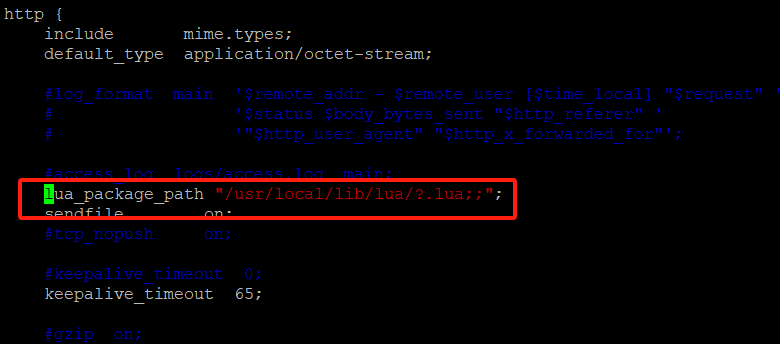
修改/usr/local/nginx/conf/nginx.conf 2025-06-18T08:31:04.png
在http段落添加lua_package_path "/usr/local/lib/lua/?.lua;;";
运行/usr/local/nginx/sbin/nginx -t测试
如不报错,即可运行
/usr/local/nginx/sbin/nginx
评论已关闭